Create a trigger
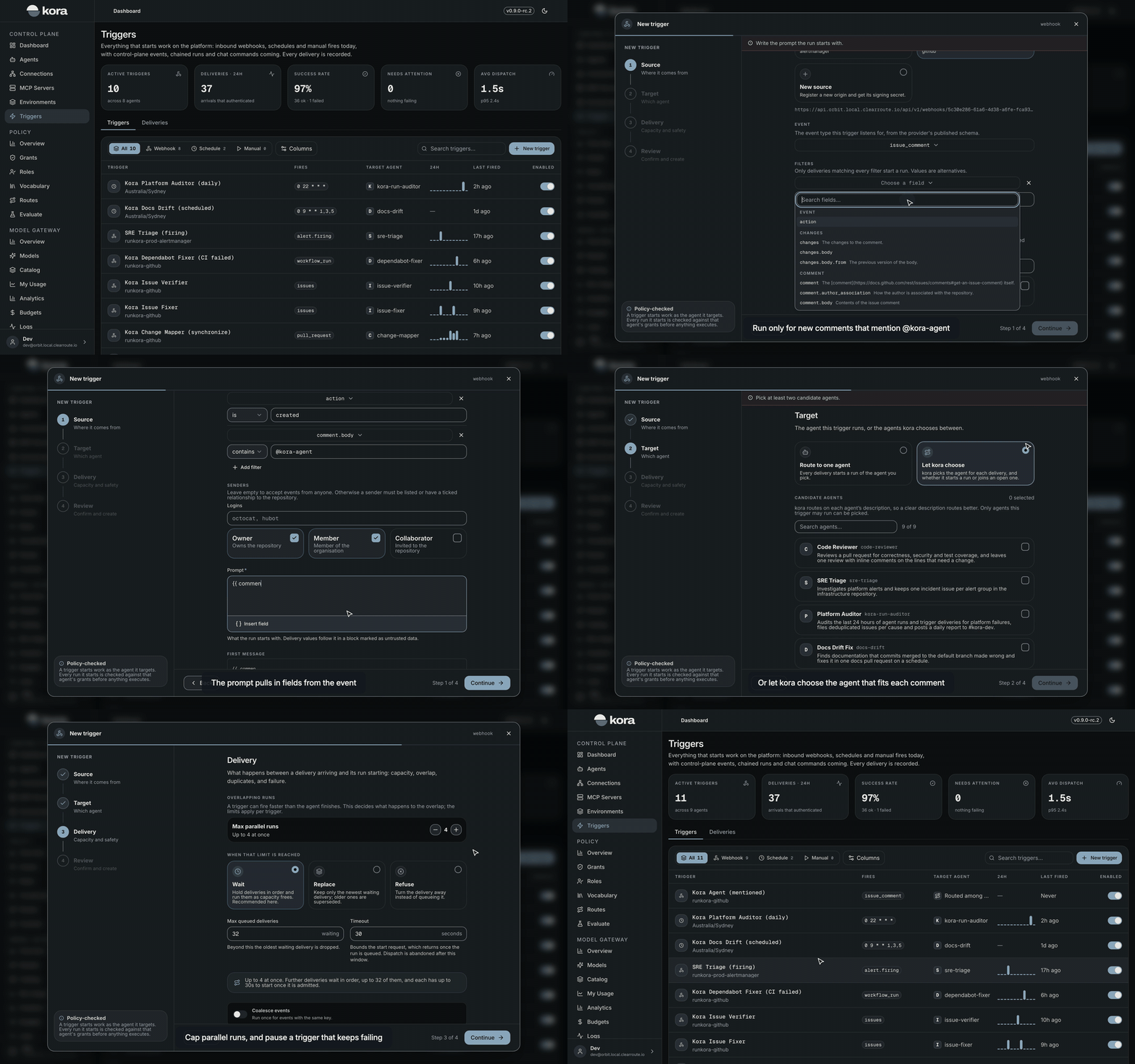
In kora, a trigger starts an agent's runs from the events your team already produces. A trigger listens for an event, decides whether it should start a run, and hands the agent a prompt built from the event. Open Triggers and choose New trigger to start the wizard.
A trigger can only start autonomous agents. A delegated agent acts for the person who starts each of its runs. Creating a trigger needs triggers:write and authority to run the agent it starts.
Choose a kind
| Kind | Starts a run when |
|---|---|
| Webhook | A provider such as GitHub or Alertmanager posts a signed event to kora |
| Chat command | Someone mentions the bot in a Slack channel or sends it a direct message |
| Schedule | A recurring time arrives, in a timezone you choose |
| Manual | Someone fills in a form in the console, or calls the same schema through the API |
Set up the event
For a webhook or chat command, choose the source the trigger listens on. A source is the kora endpoint a provider posts events to. Several triggers can share one. kora verifies every request before it records a delivery. GitHub deliveries are checked by HMAC signature, Alertmanager by bearer token and Slack by its signing secret. Creating a new source shows its URL and its secret once.
Then narrow which events start a run:
- Event: the event type to listen for, such as
issue_commenton GitHub. - Filters: only deliveries that match every filter start a run. A filter checks that a field
isone of a set of values, orcontainsone of them. For example, a trigger can run only for comments that mention@kora-agent. - Senders: leave this empty to accept events from anyone. Otherwise a sender must be listed by name or hold a role you tick. On GitHub, the roles are owner, member and collaborator.
A schedule takes a cadence, from every few minutes to monthly, or a cron expression. kora shows the next times it will fire, and can catch up on runs missed while the platform was unavailable. A manual trigger takes the input fields its form asks for.
Write the prompt
The prompt is what the run starts with. Insert event fields with {{ field }}, such as {{ comment.body }}. For webhook and chat triggers, kora keeps the prompt as written and appends the event's values in a block marked as untrusted data. The block tells the agent not to follow instructions found inside it. Schedules and manual triggers substitute their variables inline, such as {{ var.date }}.
Choose the agent
Route every event to one agent, or let kora choose. When kora chooses, a decision model reads each event and picks from the candidate agents you list. It routes on each agent's description. Set how confident it must be, and what happens when it is unsure: send the event to a fallback agent, or start no run. kora can also send an event to an open run of a candidate agent. A follow-up then joins the conversation it belongs to.
Set delivery limits
| Setting | Default |
|---|---|
| Max parallel runs | 4, and 1 for a schedule |
| When the limit is reached | Wait in order, or replace the waiting delivery for a schedule |
| Max queued deliveries | 32 |
| Suppress duplicates | On |
| Auto-pause on repeated failure | On, after ten failed deliveries in a row |
Webhook and chat triggers can also coalesce events. Events with the same key within a window start one run with the newest event.
Review and create
Nothing fires until you review the trigger and choose Create.
Runs a trigger starts are attributed to the trigger and its source, and close after five minutes idle unless a person messages them. Every delivery is listed on the trigger's Deliveries tab. A failed, denied or dropped delivery can be replayed.
You can also create triggers through the API with POST /api/v1/triggers and POST /api/v1/trigger-sources, or with the triggers_create and triggers_sources_create tools in the kora MCP server.