Create an agent
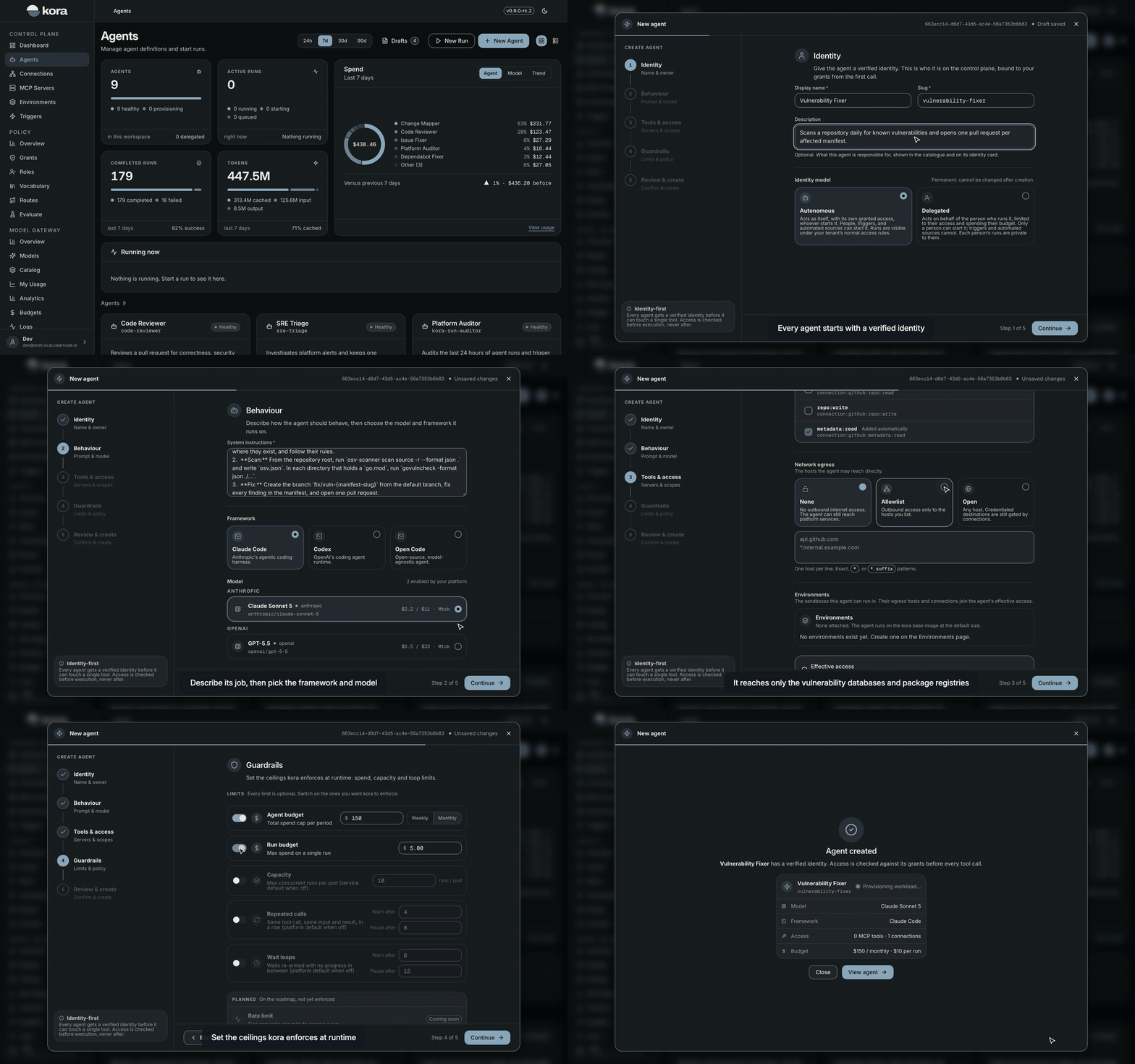
In kora, an agent is defined by its identity, its instructions and model, the tools and systems it may reach, and the limits kora enforces while it runs. Each agent gets a verified identity and its own workload in your tenant before it can touch a single tool. Open Agents and choose New agent to start the builder. The builder saves a draft as you go. Close it at any point and resume the draft from Drafts on the agents page.
Identity
Give the agent a display name and a slug. The slug names the agent's workload in Kubernetes. It uses lowercase letters, digits and hyphens, and is at most 52 characters. The description is optional and shows in the catalogue. It also drives routing. When a trigger lets kora choose the agent, a decision model picks between the candidate agents by their descriptions. Describe what the agent is responsible for in a sentence or two. The trigger wizard warns when a candidate's description is under 40 characters.
The identity model you choose here is permanent.
| Model | Acts with | Started by | Scope you need |
|---|---|---|---|
autonomous | Its own granted access | People, triggers and automated sources | agents:types:autonomous:write |
delegated | The access of the person who runs it, and their budget | A person only | agents:types:delegated:write |
Behaviour
Write the system instructions that describe how the agent works, then choose the framework and the model. The framework is the agent harness kora runs: Claude Code, Codex or OpenCode. The model list shows the models your platform team has enabled. kora grants the agent access to the model you pick.
Tools and access
The agent can only reach what you grant here. Every request is checked against these grants before it runs.
- MCP servers: grant a whole server or individual tools. Each tool you grant becomes a scope such as
mcp:github:create_issue:use. - Connections: grant the actions the agent may take on each connected system. For systems such as GitHub, you can narrow the grant to selected repositories. The agent never sees the connection's credential.
- Network egress: choose
Nonefor platform services only,Allowlistfor the hosts you list, orOpenfor any host. Credentialed systems are still reached only through connections. - Environments: attach the environments the agent may run its sandboxes in. The first one becomes the default. An agent with none runs on the
kora-baseimage at the default size.
The effective access panel shows what the agent can reach once its environments' hosts and connections are added to its own.
Guardrails
Every guardrail is optional. Switch on the ones you want kora to enforce.
| Guardrail | What it limits |
|---|---|
| Agent budget | Total spend per week or month |
| Run budget | Spend on a single run |
| Capacity | Concurrent runs on each agent pod. The service default is 10. |
| Repeated calls | The same tool call with the same result in a row. kora warns after 4 and pauses the run after 8 unless you set your own. |
| Wait loops | Waits that make no progress. kora warns after 6 and pauses after 12 unless you set your own. |
Review and create
Review the configuration and choose Create agent. kora checks that you hold every scope the agent would hold, then provisions the agent's workload. The agent shows as provisioning until its pod is ready, then becomes active and ready to run. Provisioning takes up to a few minutes.
You can also create an agent through the API with POST /api/v1/agent-types, or with the agents_create tool in the kora MCP server.